Check SQL Database Size (MB): This guide illustrates how to effectively check the sizes of MySQL databases and tables. Whether you prefer using the user-friendly phpMyAdmin web interface or the command-line mysql program, we’ve got you covered with step-by-step instructions.
Using phpMyAdmin:
You can utilize the phpMyAdmin web interface for seamless database and table size checking. Follow these simple steps:
Access phpMyAdmin:
- Log in to your cPanel account.
- Navigate to the DATABASES section and click on the phpMyAdmin icon.
Select Database:
- In the left pane, click on the desired database name.
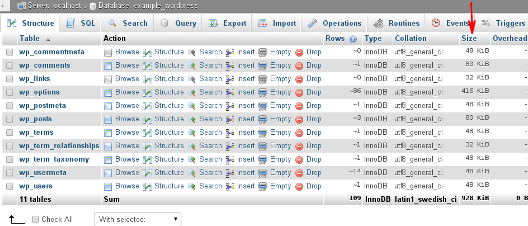
View Sizes:
- On the right pane, observe the Size column which lists the size of each table.
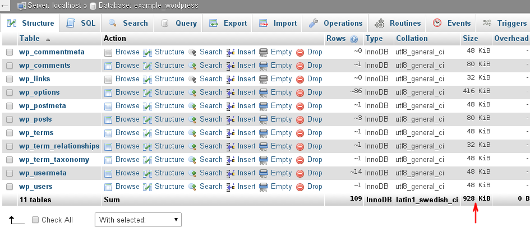
- For the total database size, scroll down to the end of the Size column.
- If necessary, click the > icon to navigate through multiple pages of tables.
Using the mysql Command-line Program:
If you prefer the command-line approach, follow these instructions:
Access via SSH:
- Log in to your account using SSH.
Run Command:
- Type the following command, replacing ‘username’ with your A2 Hosting account username:
mysql -u username -p- Enter your password when prompted to proceed to the mysql> prompt.
Check Database Sizes:
- To check sizes of all databases, type:
SELECT table_schema AS "Database", ROUND(SUM(data_length + index_length) / 1024 / 1024, 2) AS "Size (MB)" FROM information_schema.TABLES GROUP BY table_schema;- Wait for the command to complete. It will list all databases and their respective sizes.
Check Table Sizes:
- To check sizes of tables in a specific database, type:
SELECT table_name AS "Table", ROUND(((data_length + index_length) / 1024 / 1024), 2) AS "Size (MB)" FROM information_schema.TABLES WHERE table_schema = "database_name" ORDER BY (data_length + index_length) DESC;- Replace ‘database_name’ with the desired database name.
- After execution, tables and their sizes will be displayed, largest to smallest.
More Information:
- For additional assistance with phpMyAdmin, visit : phpMyAdmin’s official website.
- Explore further insights on the mysql command-line program at MariaDB’s knowledge base.